
Google Pixel Background Tracking Optimization
Ensuring Domicile365 accurately logs your location on Google Pixel devices.
Google Pixel phones use "Adaptive Battery" features that can sometimes pause apps running in the background. To ensure Domicile365 accurately logs your location, please update the following settings.
Ensure that background location tracking is toggled ON inside the Domicile365 mobile app itself.
Open Domicile365 App: Go to Settings (in the app menu).
Verify Setting: Ensure Tracking On/Off (or 'Tracking') is set to ON.
If this setting is turned OFF within the app settings menu, location tracking is paused regardless of Android system permissions.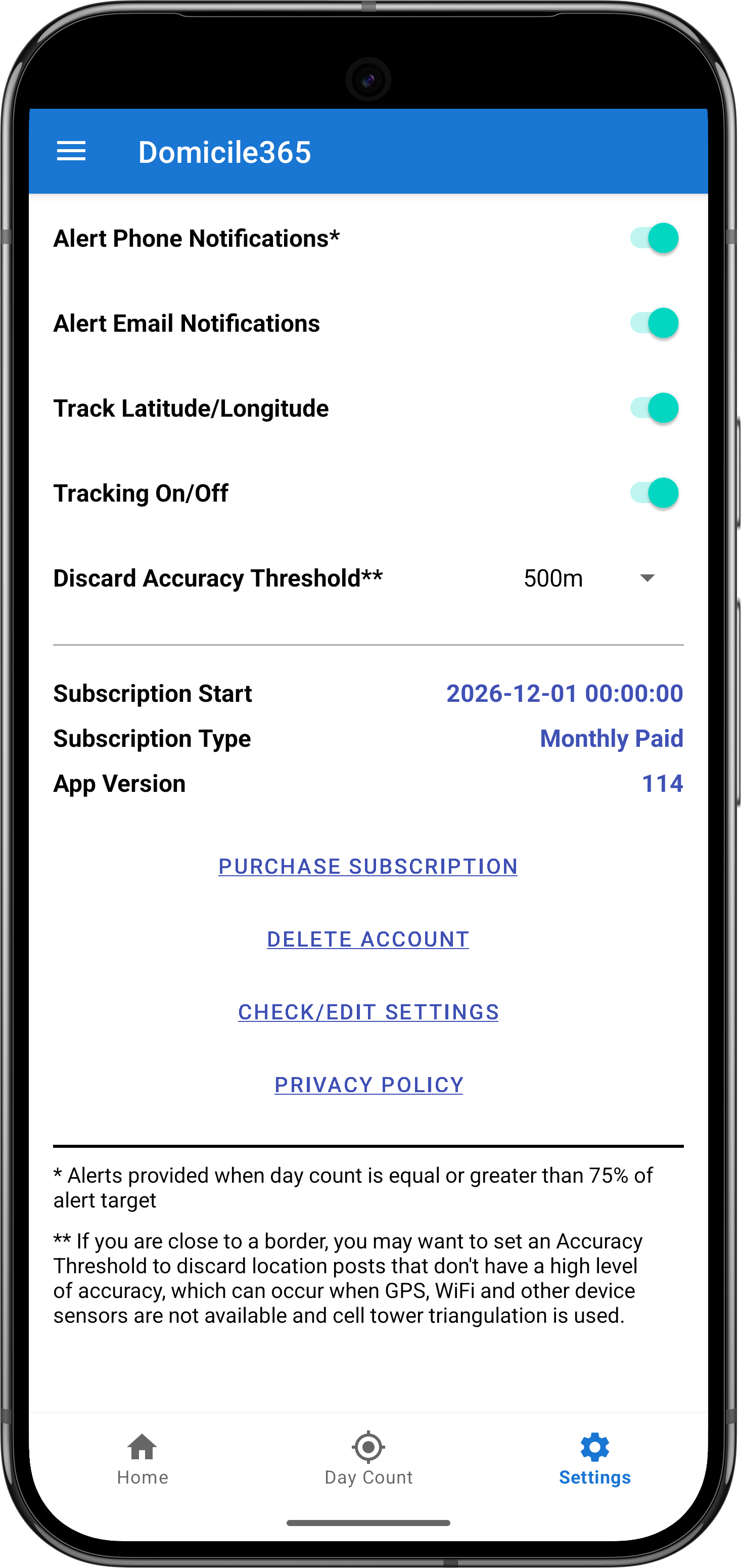
Ensure the app is allowed to run without restriction in the background.
Go to: Settings > Apps > See all apps > Domicile365
Tap on: App battery usage (or just 'Battery')
Select: Unrestricted
By default, this is often set to "Optimized", which may delay location updates.The app needs "Always" access to record your location when the phone is in your pocket.
Go to: Settings > Apps > See all apps > Domicile365
Tap on: Permissions > Location
- Select: Allow all the time
- Toggle ON: Use precise location
Allow the app to upload data even if Data Saver mode is active.
Go to: Settings > Apps > See all apps > Domicile365
Tap on: Mobile data & Wi-Fi
- Toggle ON: Background data
- Toggle ON: Unrestricted data usage
Prevent Android from revoking permissions if you haven't opened the app recently.
Go to: Settings > Apps > See all apps > Domicile365
Scroll down to the "Unused app settings" section.
Toggle OFF: Pause app activity if unused
This feature manages network connections to save battery but can frequently drop background data sessions needed to post your location.
Go to: Settings > Network & internet > Adaptive Connectivity
Toggle OFF: Adaptive Connectivity
Help your Pixel determine your location using Wi-Fi and Bluetooth, which is critical for the "Fused Location Provider" to work when GPS is weak.
Go to: Settings > Location > Location services
- Tap Google Location Accuracy and toggle it ON.
- Tap Wi-Fi scanning and toggle it ON.
- Tap Bluetooth scanning and toggle it ON.
This is a "Master Switch" that can overrule all other settings. If this is on, your Pixel will prioritize battery life over background location tracking.
Go to: Settings > Battery > Battery Saver
Toggle OFF: Use Battery Saver
Also, ensure Extreme Battery Saver is not scheduled to turn on automatically.
This feature "learns" your usage and will put apps to sleep if you don't open them frequently. This is the most common reason location only updates when you wake up or unlock your phone.
Go to: Settings > Battery > Adaptive preferences
Toggle OFF: Adaptive Battery